I've been using BetterTouchTool for years, probably longer than most. Back when it was primarily a utility for remapping trackpad gestures, I was already deep in the weeds building complex automation scripts, multi-finger workflows, and trigger chains that would make my colleagues raise an eyebrow. BTT is the kind of tool that rewards obsession, and I was happily obsessed.
But I also had Raycast sitting right next to it in my menu bar, handling everything launcher-related: quick app switching, clipboard history, file search, and a handful of extensions I'd come to rely on daily. The two tools coexisted peacefully for a long time. Then BTT 6.493 shipped — and among a sweeping set of improvements, it included a full Spotlight-style launcher built in SwiftUI. Things got interesting.
My Raycast Relationship: It's Complicated
Let me be clear: Raycast is genuinely excellent software. It's fast, well-designed, and has one of the most thoughtful extension ecosystems on macOS. I've recommended it to dozens of people and I don't regret a single one of those recommendations.
But over the past year or so, cracks started showing. The AI integration arrived with a lot of fanfare, and while Raycast's Pro plan bundles AI into its $8/month subscription, there's no real BYOK path; you're using their model selection and their API spend. Want frontier models like GPT-5 or Claude Sonnet? That's the Advanced AI add-on: an extra $8/month stacked on top of Pro, bringing the all-in price to $16/month. Raycast's own FAQ is transparent about it: you can't get a Pro subscription without AI bundled in, even if you want to disable the feature entirely.
To be fair, the free tier is still legitimately good. App launching, file search, window management, and the full community extension store (1,000+ extensions) are free forever. But the moment you want unlimited clipboard history, cloud sync across your Macs, or meaningful AI integration, you're subscribing. When you already pay for direct Claude or OpenAI API access, being funneled toward a parallel subscription for the same underlying models (with no BYOK escape) creates a compounding friction that's hard to ignore.
- Free — app launching, file search, window management, 1,000+ community extensions, clipboard history capped at 30 days
- Pro ($8/mo annual) — unlimited clipboard, cloud sync, AI with standard models (GPT-4o-mini, Claude Haiku 3.5, Llama 3.3)
- Pro + Advanced AI ($16/mo annual) — adds frontier models: GPT-5, Claude Sonnet, o3, Gemini 2.5 Pro
- No BYOK option — you use Raycast's API keys, not your own
Enter the BTT Launcher
When I saw that BTT 6.493 had shipped a launcher, my reaction was cautious curiosity. Andreas Hegenberg has a track record of shipping features that go much deeper than the surface suggests, but launchers are crowded territory and first versions are usually rough.
I was wrong to be cautious.
The scope of what shipped in the 6.493 release is genuinely impressive. The launcher can search and run installed apps, running apps, windows, BTT actions, configured triggers, floating menus, clipboard history, files, folders, System Settings panes, AI assistants, calendar items, reminders, notes, timers, emoji, and Now Playing controls, all from a single prompt. You can configure multiple independent launcher instances, each with their own sections and behaviors, pin frequently used items, and assign custom keywords, aliases, and per-item shortcuts. Usage learning and fuzzy matching means it gets faster the more you use it.
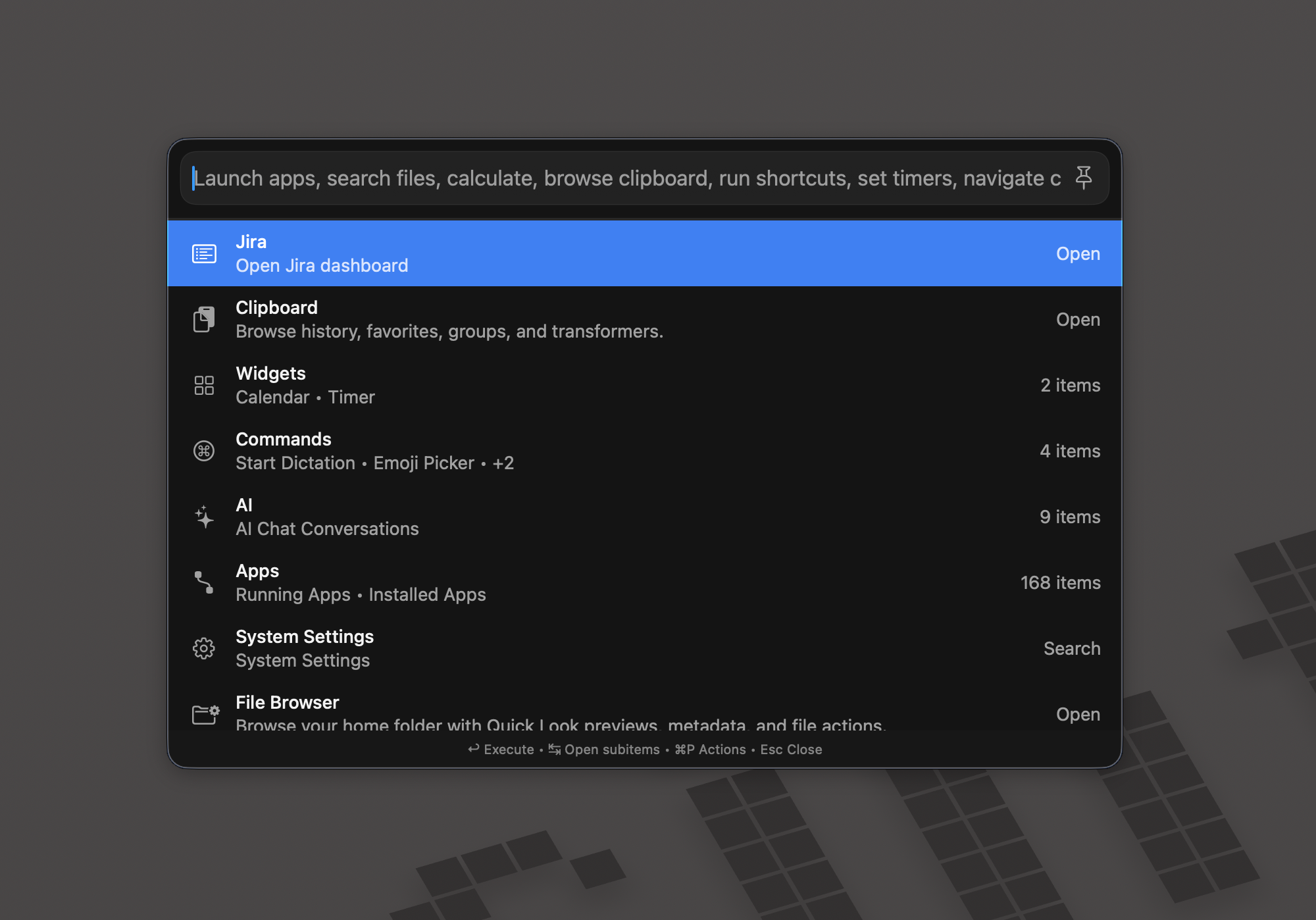
Beyond search, the launcher includes built-in utility surfaces for timers, speech dictation, unit conversion, currency conversion, and notes. The natural language math is powered by the Soulver core engine, which means expressions like "1h 30min + 1h 25min + 30min", "100°C - 23°F", or "55usd + 33%" are resolved instantly with no special syntax. Having used Soulver as a standalone app for years, having that engine baked into a launcher is a genuinely exciting integration.
Two things stood out most to me. First, the in-launcher file browser: you can navigate folders, Quick Look files, use Open With, copy paths, and drag items out, all without leaving the launcher. That's a level of depth Raycast's file search doesn't match. Second, the Swift-based plugin model, which deserves real attention.
Raycast extensions are built in JavaScript and TypeScript via React, approachable for web developers but constrained in what they can do natively on macOS. BTT's plugin system, documented at docs.folivora.ai/docs/plugins, lets you write actual Swift (or Objective-C), with auto-compilation from .swift files, hot reload when source files change, and a trust system that requires user approval before any plugin runs and re-approval after any modification. The full macOS SDK is available. It's a fundamentally different ceiling.
The AI Story
BTT's AI integration is the mirror image of Raycast's. Rather than bundling specific models and charging for tier access, BTT lets you connect your own keys: OpenAI, Anthropic Claude, local models via Ollama, LM Studio, or Jan, Apple Foundation Models, and Claude or Codex CLI tools. The 6.493 release notes list support for GPT-5.5, redesigned setup flows for all major AI providers, and ChatGPT OAuth sign-in for users who have a ChatGPT subscription but no API key.
More importantly for plugin builders: you can use AI to generate Swift plugin code directly inside BTT. Describe what you want, get working scaffolded Swift, iterate. For someone who already lives in BTT for automation work, this collapses the barrier to building custom tooling dramatically.
A Word on the Developer
I don't usually write about developers in product reviews, but Andreas Hegenberg deserves a specific mention here. The pace of iteration on BTT is unusual for a one-person project. The launcher went from initial alpha to a feature-complete beta tracked in a public community thread, with feature requests visibly landing in subsequent betas, in a matter of weeks. The release notes read like a developer who genuinely uses their own software and is trying to make it better for people who use it the same way he does.
When I reported a specific quirk in the launcher, I got a thoughtful response within hours. That kind of relationship with a developer changes how you use a tool: you trust it more, you invest more, you push its limits with the confidence that weirdness will get fixed.
Three Plugins, One Weekend
The real test was whether I could replicate my most-used Raycast workflows in BTT. I picked the three extensions I rely on most heavily and rebuilt them as native Swift plugins, using BTT's AI integration to scaffold the initial code. Here's how that went:
Plugin 01
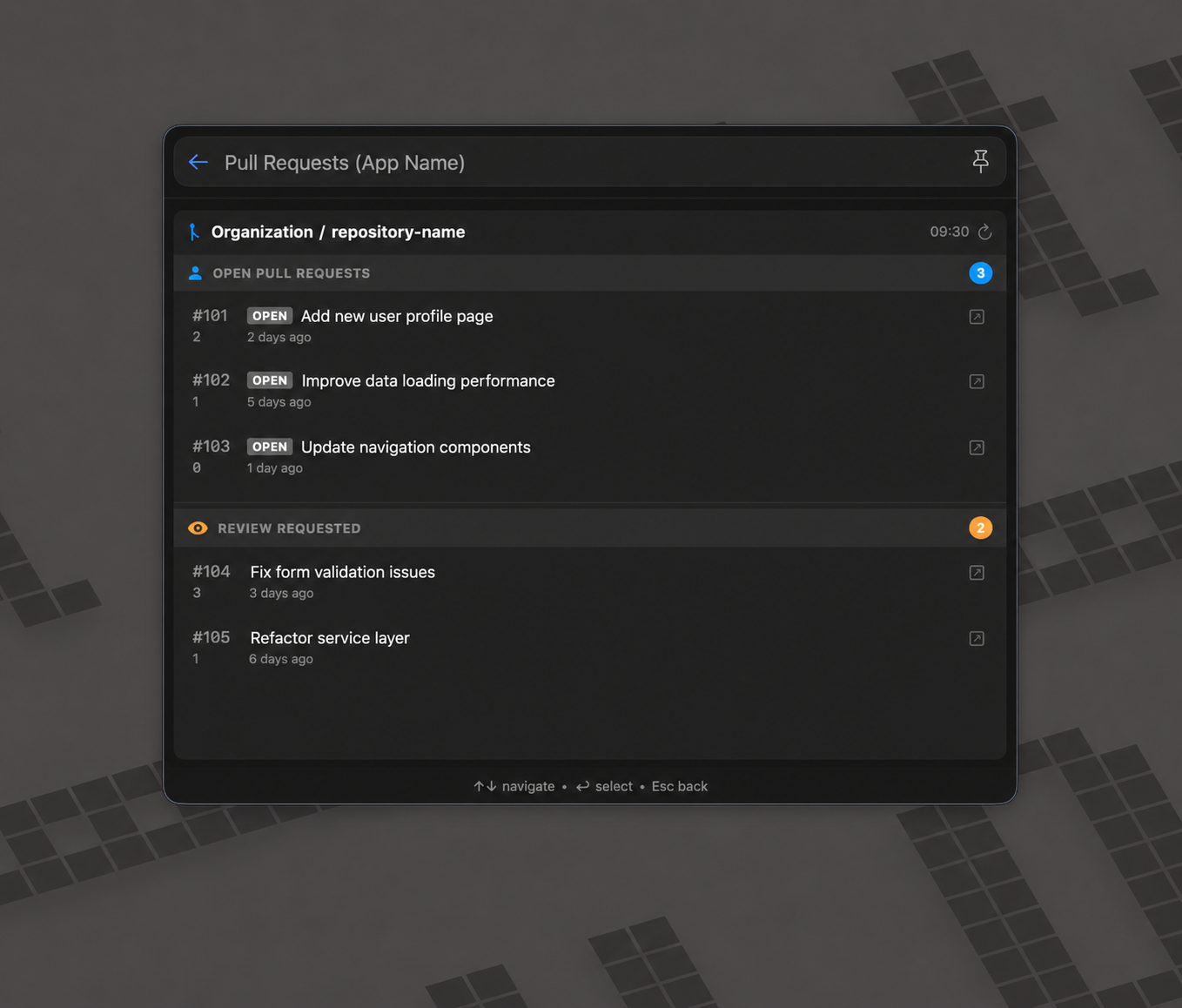
GitHub PR Search
Quick access to my open pull requests across all repositories, surfacing PR status, reviewers, and CI state in a single keystroke without opening a browser tab.
The BTT version ended up more capable than the Raycast equivalent because I could use the Gh cli directly from Swift and cache results locally between calls. Hot reload meant I could iterate on the UI without restarting anything. Noticeably snappier response times than the JS-based Raycast extension.
Plugin 02
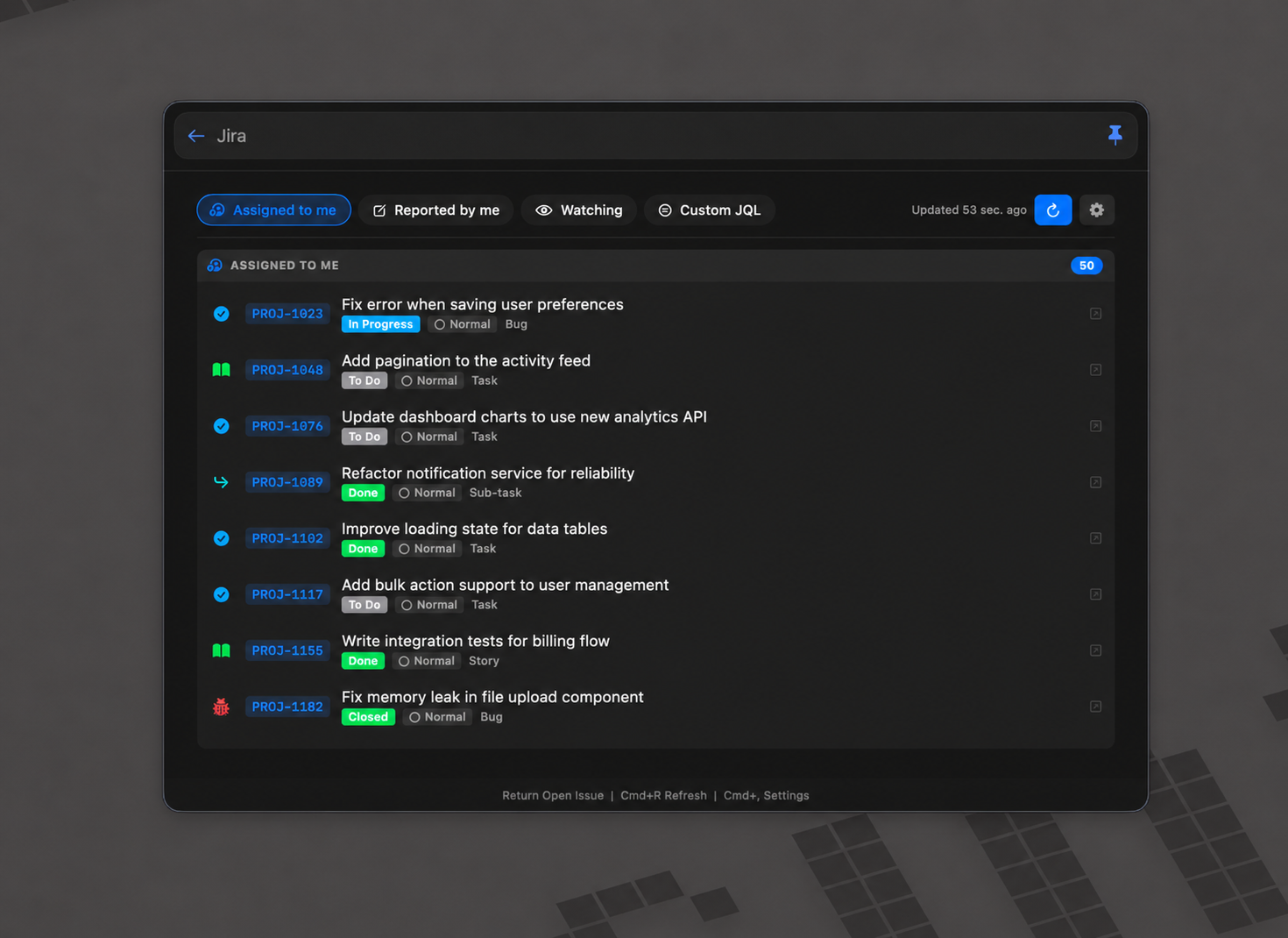
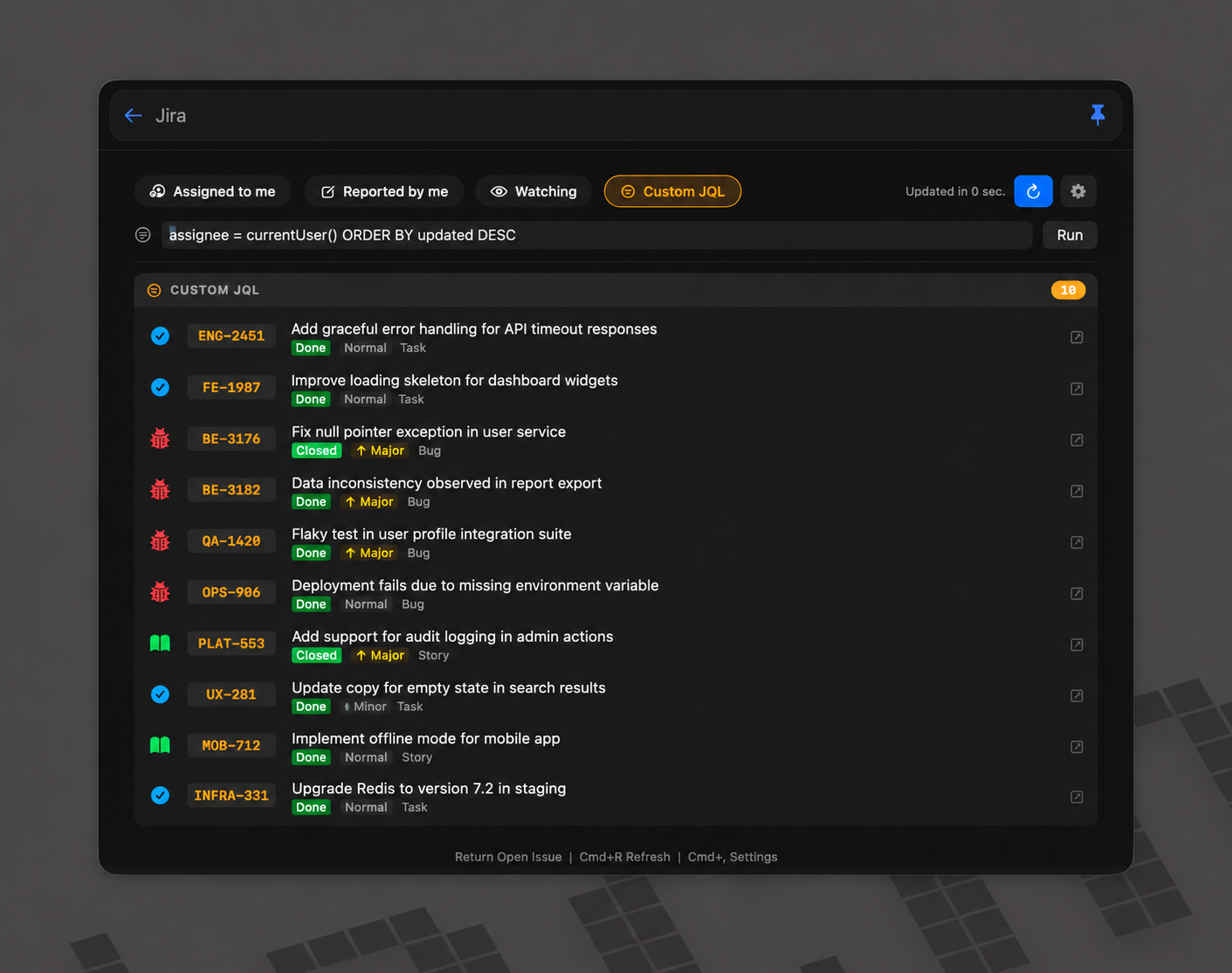
Jira Issue Browser
Instant access to my assigned Jira issues, filtered by sprint, status, and priority, with the ability to open issues directly in the browser without leaving the launcher.
Plugin 03
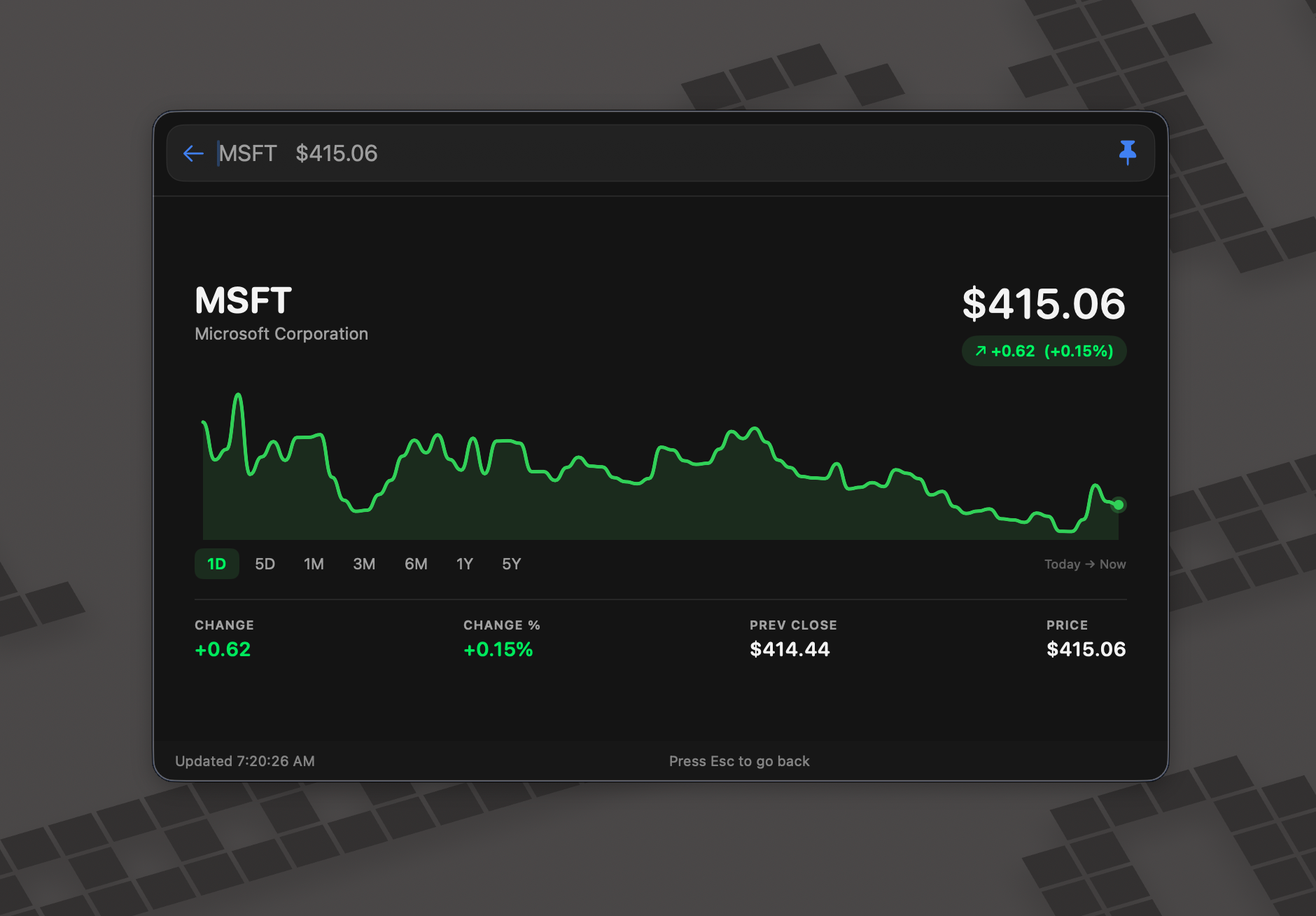
Stock Price Tracker
Real-time prices for a watchlist of tickers, with percentage change, in one keystroke with no context switching.
How They Stack Up
| Feature | Raycast | BTT Launcher |
|---|---|---|
| Speed & responsiveness | Excellent | Excellent |
| File search | Very good | Very good + in-launcher browser |
| Plugin ecosystem breadth | Mature — 1,000+ extensions | Still growing |
| Plugin depth / control | Good — JS/TypeScript/React | Superior — native Swift |
| AI / BYOK & model choice | No BYOK; model tier is subscription-gated | Full BYOK; OpenAI, Claude, local models |
| Unlimited clipboard history | Pro only ($8/mo) | Included |
| Config sync across Macs | Pro only (Cloud Sync) | Included |
| Natural language calculator | Basic | Soulver Core — very powerful |
| macOS version support | Broad support | Launcher optimised for macOS 26+ |
| Dev responsiveness | Good | Exceptional — solo dev, fast betas |
| Overall polish / stability | Excellent — mature product | Good — launcher still beta |
The Honest Verdict
I'm not switching completely — not yet. Raycast is a mature, stable product with years of polish and a large community-built extension library. The BTT launcher is still in beta, is primarily tested on macOS 26, and has real gaps in the breadth of community plugins available. That's not nothing.
But the ingredients are all there. The Swift plugin model is technically superior to what Raycast offers. The AI integration is more open: full BYOK, no subscription tiers gating model access. The features Raycast puts behind its Pro subscription ship as part of BTT by default. The Soulver-powered calculator is the best natural language math I've used in a launcher. And the developer is one of the most responsive I've encountered in years of following macOS software.
The three plugins I rebuilt in a weekend work well enough that I've defaulted to BTT for those specific workflows entirely. Each week that number creeps up a little. I suspect that in a few months, my Raycast usage will be minimal, not because I was pushed out by pricing friction, but because BTT quietly earned it.
If you're already a BetterTouchTool user (especially if you use it for automation and scripting like I do), the launcher is a natural evolution you should absolutely try. The mental model is already there. You already trust the tool. Now it just does more.
And if you're a Raycast user feeling the same low-grade friction I was? It might be worth a weekend. Build one plugin. See what it feels like to have the full macOS SDK at your disposal instead of a React component tree. You might be surprised how quickly the ceiling disappears.
What's next
I'll be writing up the actual Swift code behind each of the three plugins in follow-up posts, including the exact prompts I used with BTT's AI integration to scaffold the initial code and the gotchas I hit along the way. If you want to build your own plugins, the official plugin docs are a good starting point, and the community forum has active threads on launcher plugin development.
If you've made a similar switch, or tried and gone back to Raycast (or Alfred), I'd genuinely love to hear about it.
✦ More macOS tooling posts to come
Comments